
The one number that actually measures password strength
When you type a password into a "strength meter" and it turns green, you have learned almost nothing. Color bars are guesses about guessability, and different sites disagree wildly. The number that actually means something is entropy, measured in bits — a mathematical estimate of how many attempts an attacker would need to guess your password by brute force.
Here is the intuition in one line: each additional bit of entropy doubles the number of guesses an attacker must make. A password with 40 bits of entropy has roughly a trillion possible combinations; add 10 bits and you multiply the work by about 1,000. That is why entropy, not a green bar, is the honest yardstick.
This post explains where those bits come from, why length matters far more than cramming in symbols, how to read "crack time" estimates without fooling yourself, and why the biggest real-world risk has nothing to do with math at all. If you just want a strong one right now, our in-browser password generator builds one that never leaves your device.
How entropy is calculated: pool size and length
For a randomly generated password, entropy is calculated with a simple formula:
entropy (bits) = length × log2(pool size)
The "pool" is the set of characters you draw from. The bigger the pool and the longer the password, the more bits you get. Standard pool sizes:
- Lowercase only (a–z): 26 characters → about 4.7 bits per character
- Lowercase + uppercase (a–z, A–Z): 52 → about 5.7 bits per character
- + digits (0–9): 62 → about 5.95 bits per character
- + common symbols: roughly 95 → about 6.57 bits per character
So a 12-character password drawn randomly from the full ~95-character keyboard set is 12 × 6.57 ≈ 79 bits. A 12-character password using only lowercase is 12 × 4.7 ≈ 56 bits. Same length, very different strength — because the pool changed.
One crucial caveat: this formula only holds when each character is chosen randomly and independently. "Password123!" technically draws from a 95-character pool, but it is a dictionary word plus a predictable suffix, so its real entropy is a tiny fraction of the formula's answer. Attackers try common patterns first.
Why length beats complexity almost every time
Here is the counterintuitive part most "use a symbol!" advice gets wrong. Because entropy scales linearly with length but only logarithmically with pool size, adding characters is a far more powerful lever than adding symbol variety.
Compare two randomly generated passwords:
- 8 characters from the full 95-symbol pool:
8 × 6.57 ≈ 53 bits - 14 characters from lowercase only:
14 × 4.7 ≈ 66 bits
The longer all-lowercase password is meaningfully stronger — and far easier to type. This is the math behind the famous "correct horse battery staple" idea: a passphrase of several random words can reach high entropy while staying memorable.
But estimate passphrase entropy honestly. Its strength comes from how many words the list had and how many were chosen at random, not the letter count. Four words picked randomly from a 7,776-word list (the standard Diceware list) give 4 × log2(7776) ≈ 4 × 12.9 ≈ 51 bits; six words give about 77 bits. Words you picked yourself because they mean something to you are far weaker — attackers model human choices. If you want to see length's effect live, generate a few options at different lengths in our password generator and watch the estimate climb.
Turning bits into crack time (and reading it honestly)
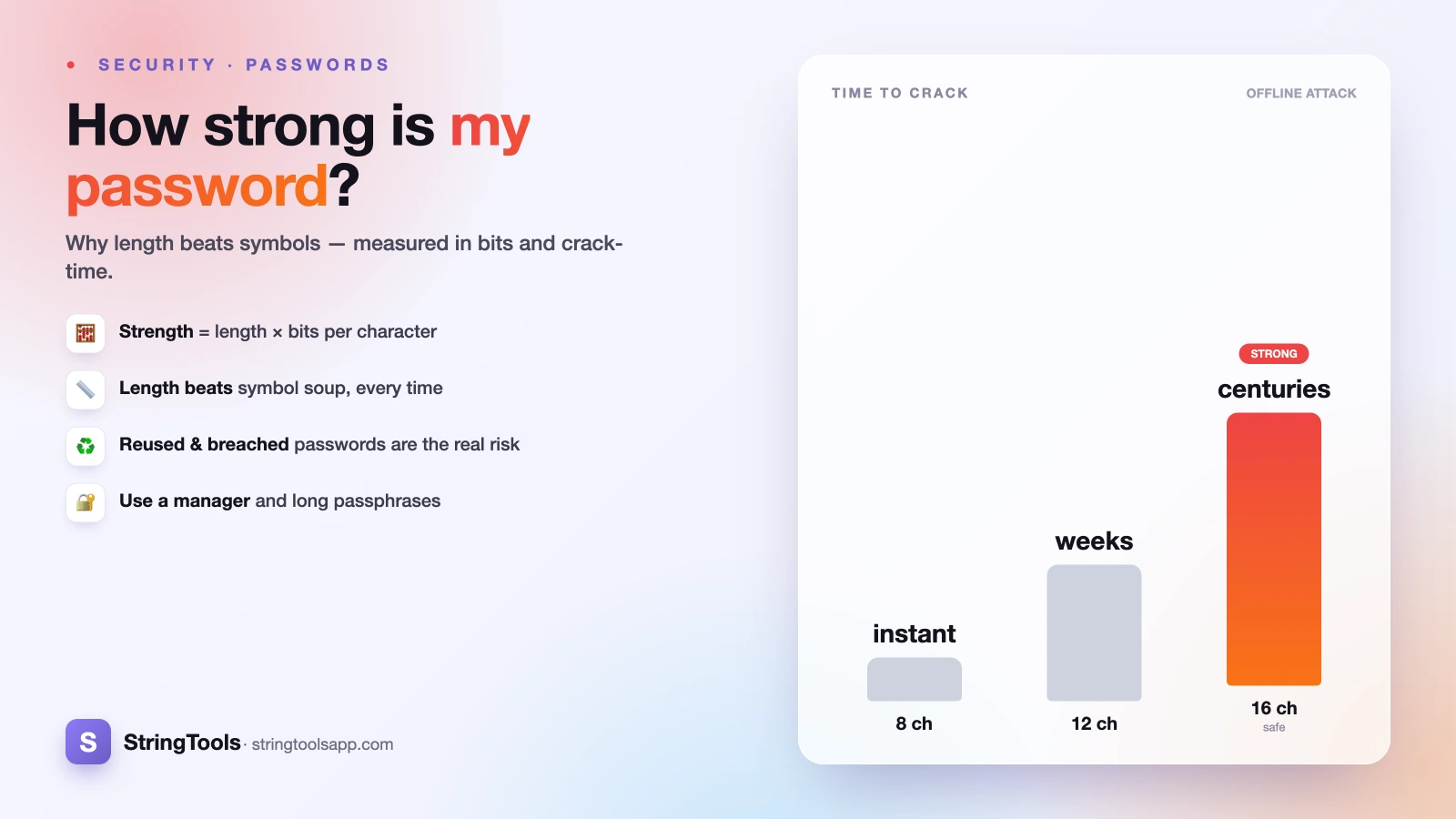
Entropy becomes tangible when you translate it into time. The rough model: total guesses ≈ 2^entropy, and on average an attacker finds the password after trying half of them. Divide by how many guesses per second they can make.
The guess rate depends entirely on the attack. In an offline attack — where a site's password database has been stolen — the speed hinges on how the passwords were stored (hashed). A fast, outdated hash like unsalted MD5 or SHA-1 can be attacked at billions or even trillions of guesses per second on modern GPU rigs. A slow, purpose-built hash like bcrypt, scrypt, or Argon2 might allow only thousands or tens of thousands per second — a difference of a millionfold or more.
At an illustrative 100 billion guesses/second against a fast hash:
- 50 bits (~1.1 quadrillion combos): cracked in a few hours
- 60 bits: roughly a couple of weeks
- 70 bits: on the order of centuries
- 80 bits: comfortably beyond any practical attack
Treat every one of these as an order-of-magnitude estimate, not a guarantee. The real number shifts with hardware, the hash algorithm, whether a salt was used, and how much the attacker knows about your habits. Anyone quoting a precise "it would take 3 million years" is overselling certainty.
The risk entropy can't see: reuse and breaches
Here is the uncomfortable truth: for most people, entropy is not the thing that gets them hacked. Reused and breached passwords are.
Billions of username-and-password pairs have leaked from past breaches and circulate on the internet. Attackers take those lists and run credential stuffing — automatically trying the same email-and-password combo across hundreds of other sites. If your 90-bit masterpiece protects your email and your bank and an obscure forum that got breached, the attacker does not need to crack anything. They already have it, and they will walk straight into every account where you reused it.
This is why two habits matter more than raw strength:
- Never reuse passwords across sites. A unique password per account means one breach stays contained to one account.
- Check whether a password has appeared in a breach. If it has, it is effectively public no matter how many bits it scores, and should be retired immediately.
A maximally strong password that you have used in five places is weaker, in practice, than five "merely good" passwords used once each. Uniqueness is the multiplier entropy math never captures.
Password managers: the honest best answer
If every account needs a long, unique, random password, no human can memorize that. This is exactly the problem a password manager solves, and it is the single most effective upgrade most people can make.
A password manager generates high-entropy passwords, stores them encrypted, and fills them in for you — so you only memorize one strong master passphrase. That trade is overwhelmingly worth it: you move from a handful of reused, human-chosen passwords to hundreds of unique, random ones, and the reuse risk from the previous section largely disappears.
There are reasonable options across ecosystems, including well-reviewed open-source and built-in browser and OS managers. The point is not which brand — it is that a good generator plus never reusing beats memorized cleverness every time. Human-invented "clever" substitutions (P@ssw0rd, replacing o with 0) fool no one; cracking tools have modeled those tricks for decades.
For the accounts you must type by hand — your device login, your password manager's master key — a long random passphrase is the sweet spot: high entropy and actually memorable. See our companion guide, how to create a strong password, for a step-by-step method.
A quick self-check you can run today
You do not need special software to sanity-check your password habits. Walk through this:
1. Is it long? Aim for at least 12–16 random characters, or a passphrase of 5–6 randomly chosen words. Length is your cheapest source of bits. 2. Is it random? If a person (including you) chose the words or pattern, discount its entropy heavily. Machine-generated is stronger than human-clever. 3. Is it unique? If this password protects more than one account, that is your top priority to fix — ahead of adding symbols. 4. Is it possibly breached? If you have used it for years across sites, assume it may be on a list and replace it. 5. Have you enabled two-factor authentication? Even a cracked or stolen password is far less useful to an attacker when a second factor stands in the way. It is a safety net, not a substitute for a strong, unique password.
Strength is not one heroic password — it is the system: long, random, unique, backed by 2FA and a manager.
Generate a strong password now — privately
Entropy explains why a password is strong; a good generator just makes one for you. Our tool runs entirely in your browser — the passwords it creates are built on your own device using your browser's secure randomness, and are never sent to our servers or stored anywhere by us. Nothing leaves your machine.
You can dial the length up (remember: length is your biggest lever), choose which character pools to include, and get a fresh high-entropy password in one click — then paste it straight into your password manager.
One last honest note: no single number here is a promise. Crack times are estimates that shift with hardware and how each site stores your password, and the strongest password still fails if you reuse it or hand it over in a phishing email. But get the fundamentals right — long, random, unique, plus 2FA — and you are ahead of the overwhelming majority of accounts online.
Ready? Create one now with our free password generator, and read how to create a strong password if you want the full method.
Frequently Asked Questions
What is a good number of bits of entropy for a password?
As a practical target, aim for at least 70–80 bits of entropy for important accounts. Around 80 bits is comfortably beyond any realistic brute-force attack today. You reach that with roughly 12–16 random characters from a full keyboard pool, or a passphrase of about six randomly chosen words. Remember these are estimates, and uniqueness matters as much as raw bits.
Is a longer password or a more complex one stronger?
Length usually wins. Entropy grows linearly with length but only logarithmically with the size of the character pool, so adding characters gains more bits than adding symbol variety. A long all-lowercase passphrase can easily beat a short symbol-heavy password, and it is far easier to type and remember. Add variety too if it is free, but never sacrifice length for it.
How accurate are password crack-time estimates?
Treat them as order-of-magnitude guides, not guarantees. The real time depends on how the site stored your password (a slow hash like bcrypt or Argon2 is millions of times harder to attack than unsalted MD5), the attacker's hardware, and whether your password follows a predictable pattern. Any tool quoting a precise number of years is overstating a rough estimate.
Why is reusing passwords more dangerous than a weak one?
Because of credential stuffing. Billions of leaked email-and-password pairs circulate online, and attackers automatically try them across many sites. If you reuse one password and any site holding it is breached, attackers can log into every other account with the same combo — no cracking required. A unique password per site keeps one breach contained to one account.
Are passwords from an online generator safe to use?
It depends on where they are generated. Our password generator runs entirely in your browser, so the passwords are created on your own device and are never sent to or stored on our servers. Avoid generators that transmit results to a server. Pair any generated password with a password manager so you can use a unique one everywhere without memorizing them.